Scroll indicator done
728x90

# Django 실행

conda activate hellodjango

cd hellodjango

code hellodjango


- homepage/view.py

from django.shortcuts import render
import datetime

from django.views.generic import TemplateView

class HomepageView(TemplateView):
    template_name = 'index.html'

    def get_context_data(self, **kwargs):
        context = super().get_context_data(**kwargs)
        context['my_statement'] = 'Nice to see you !'
        return context

    def say_bye(self):
        return "Good Bye"
    
    def current_datetime(self):
        now = datetime.datetime.now()
        return now


conda deactivate     # 가상환경 비활성화

conda create -n pythonweb python=3.8    # 가상환경 만들기

conda activate pythonweb    # 가상환경 접속

pip install django    # django 설치

django-admin startproject mysite    # startproject 옵션

dir my*     # my 로 시작하는 DIR 

        2022-05-31  오후 03:34    <DIR>          mysite

python -m django --version    # django 버전 확인


# Django 에서의 애플리케이션 개발 방식

애플리케이션 : 웹사이트의 전체 프로그램 또는 모듈화된 단위 프로그램

프로젝트 : 사이트에 대한 전체 프로그램

장고의 MVT 패턴


# Model - 데이터베이스 정의

모델에 사용될 데이터에 대한 정의를 담고 있는 장고의 클래스

ex.

from django.db import models

class Person(models.Model):
	first_name = models.CharField(max_length=30)
    last_name = models.CharField(max_length=30)

CREATE TABLE myapp_persion (
	"id" serial NOT NULL PRIMARY KEY,
    "first_name" VARCHAR(30) NOT NULL
    "last_name" VARCHAR(30) NOT NULL
);

# URLconf - URL 정의

파이썬의 URL 정의 방식은 자바나 PHP 계열의 URL 보다 직관적, 이해하기 쉬움

urls.py 파일에 URL과 처리 함수(VIew) 를 매핑하는 코드 작성

ex.

from django.urls import path

form . import views

urlpatterns = [
	path('articles/.., views.special_case_2003),
 	..
    ..
]

# View - 로직 정의

데이터베이스 접속 등 해당 애플리케이션의 로직에 맞는 처리를 하고

결과 데이터를 HTML 로 변환하기 위해 템플릿 처리를 한 후에

최종 HTML 로 된 응답 데이터를 웹 클라이언트에게 반환하는 역할

ex.

from django.http import HttpResponse
import datetime

def current_datetime(request):
	now = datetime.datetime.now()
    html = "<html><body>It is now %s:</body></html>" % now
    return HttpResponse(html)

# Template - 화면 UI 정의

개발자가 응답에 사용할 HTML 파일을 작성하면 장고는 이를 해석하여 최종 HTML 텍스트 응답을 생성하고 클라이언트에게 보냄

TEMPLATES 및 INSTALLED_APPS 에서 지정된 앱의 디렉토리를 검색

    (프로젝트 설정 파일 settings.py 파일에 정의되어 있음)


# MVT 코딩 순서

프로젝트 뼈대 만들기 ( 앱 개발에 필요한 디렉토리, 파일 생성 )

모델 코딩 ( 테이블 관련 사항을 개발 models.py, admin.py )

URLconf 코딩 ( URL 및 뷰 매핑 관계 정의 urls.py )

템플릿 코딩 ( 화면 UI 개발 templates/ )

뷰 코딩 ( 애플리케이션 로직 개발 views.py )


# polls/  만들기

python manage.py startapp polls     # startapp polls

tree /f    # tree 구조로 dir 확인

tree /f

cd .. 

code mysite     # Visual Code 로 mysite 실행

cd mysite


- setting.py ( ** 수정 사항 )

import os 

ALLOWED_HOSTS = ['127.0.0.1', 'localhost']

INSTALLED_APPS = [
    'django.contrib.admin',
    'django.contrib.auth',
    'django.contrib.contenttypes',
    'django.contrib.sessions',
    'django.contrib.messages',
    'django.contrib.staticfiles',
    'polls.apps.PollsConfig', 
]

DATABASES = {
    'default': {
        'ENGINE': 'django.db.backends.sqlite3',
        'NAME': os.path.join(BASE_DIR / 'db.sqlite3'),
    }
}

LANGUAGE_CODE = 'ko-kr'

TIME_ZONE = 'Asia/Seoul'

python manage.py migrate    # update 내용 migrate   

python manage.py runserver  

python manage.py createsuperuser

사용자 이름 : sseni
이메일 주소: 
Password:
Password (again):
비밀번호가 너무 짧습니다. 최소 8 문자를 포함해야 합니다.
비밀번호가 전부 숫자로 되어 있습니다.
Bypass password validation and create user anyway? [y/N]: y
Superuser created successfully.

http://127.0.0.1:8000/admin/

cd polls    # polls 폴더 이동


- polls/models.py

from django.db import models

# Create your models here.

class Question(models.Model):  
    question_text = models.CharField(max_length=200)
    pub_date = models.DateTimeField('date published')

    def __str__(self):  # 질문 불러오기
        return self.question_text


class Choice(models.Model):   # 답변 선택
    question = models.ForeignKey(Question, on_delete=models.CASCADE)  # foreignKey에 해당하는 질문 삭제
    choice_text = models.CharField(max_length=200)
    votes = models.IntegerField(default=0)  # 표를 받은 항목 count

    def __str__(self):
        return self.choice_text

- polls/admin.py

from django.contrib import admin

# Register your models here.
from polls.models import Question, Choice


admin.site.register(Question)
admin.site.register(Choice)

python manage.py makemigrations    # Database 변경 사항 같은 update 내용 추출 ( migrate )

python manage.py runserver

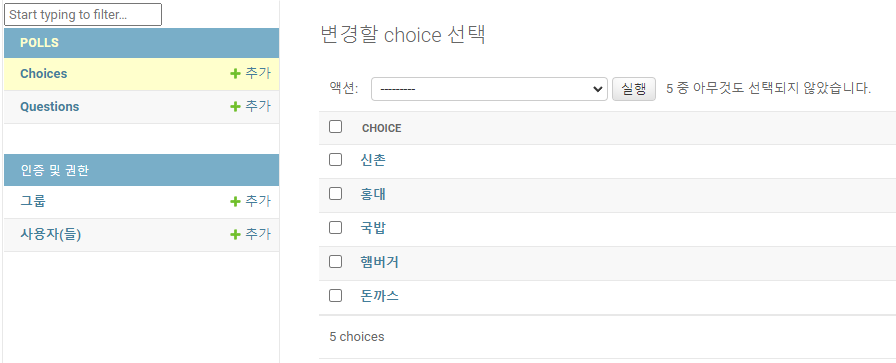
Choices, Questions 생성


# view , Templates 만들기

- urls.py

from django.contrib import admin
from django.urls import path, include


urlpatterns = [
    path('admin/', admin.site.urls),

    # shkim
    path('polls/', include('polls.urls')),
]

- polls/urls.py

from django.contrib import admin
from django.urls import path
from polls import views

app_name = 'polls'
urlpatterns = [
    path('admin/', admin.site.urls),
    path('', views.index, name='index'),      # /polls/
    path('<int:question_id>/', views.detail, name='detail'),       # /polls/5/
    path('<int:question_id>/results/', views.results, name='results'),     # /polls/5/results/
    path('<int:question_id>/vote/', views.vote, name='vote'),      # /polls/5/vote/
]

"""
app_name = 'polls'
urlpatterns = [
    path('admin/', admin.site.urls),
    path('polls', views.index, name='index'),        # /polls/
    path ('polls/<int:question_id>/', views.detail, name='detail'),   # /polls/5/
    path('polls/<int:question_id>/results/', views.results, name='results'),  # /polls/5/results/
    path('polls/<int:question_id>/vote/', views.vote, name='vote')         # /polls/5/vote/
]
"""

polls/templates 폴더 생성

polls/templates/polls 폴더 생성

polls/templates/polls/index.html 파일 생성


- polls/templates/polls/index.html

{% if latest_question_list %}
    <ul>
    {% for question in latest_question_list %}
        <li><a href="/polls/{{ question.id }}/">{{ question.question_text }}</a></li>
    {% endfor %}
    </ul>
{% else %}
    <p>투표할 설문이 없습니다. </p>
{% endif %}

- polls/views.py

from django.shortcuts import render
from polls.models import Choice, Question
# Create your views here.

def index(request):
    latest_question_list = Question.objects.all().order_by('-pub_date')[:5]
    context = {'latest_question_list': latest_question_list}  # 딕셔너리 형태로 
    return render(request, 'polls/index.html', context)  # render - 단축 함수

render - 웹 프로그래밍 시 많이 사용, 결과를 request 객체에 담아 반환하는 용도로 많이 사용

- polls/templates/polls/detail.html

<h1>{{ question.question_text }}</h1>

{% if error_message %}<p><strong>{{ error_message }}</strong></p>{% endif %}

<form action="{% url 'polls:vote' question.id %}" method="post">
{% csrf_token %}    <!--보안 공격 방지하기 위해 -->
{% for choice in question.choice_set.all %}
    <input type="radio" name="choice" id="choice{{ forloop.counter }}" value="{{ choice.id }}" />
    <label for="choice{{ forloop.counter }}">{{ choice.choice_text }}</label><br />
{% endfor %}
<input type="submit" value="Vote" />
</form>

- polls/views.py

from django.shortcuts import get_object_or_404, render
from django.http import HttpResponseRedirect
from django.urls import reverse
from polls.models import Choice, Question
# Create your views here.

def index(request):
    latest_question_list = Question.objects.all().order_by('-pub_date')[:5]
    context = {'latest_question_list': latest_question_list}  # 딕셔너리 형태로 
    return render(request, 'polls/index.html', context)  # render - 단축 함수

def detail(request, question_id):
    question = get_object_or_404(Question, pk=question_id)
    return render(request, 'polls/detail.html', {'question': question})


def results(request, question_id):
    question = get_object_or_404(Question, pk=question_id)
    return render(request, 'polls/results.html', {'question': question})

def vote(request, question_id):
    question = get_object_or_404(Question, pk=question_id)
    try:
        selected_choice = question.choice_set.get(pk=request.POST['choice'])
    except (KeyError, Choice.DoesNotExist):
        # Redisplay the question voting form.
        return render(request, 'polls/detail.html', {
            'question': question,
            'error_message': "You didn't select a choice.",
        })
    else:
        selected_choice.votes += 1
        selected_choice.save()
        # Always return an HttpResponseRedirect after successfully dealing
        # with POST data. This prevents data from being posted twice if a
        # user hits the Back button.
        return HttpResponseRedirect(reverse('polls:results', args=(question.id,)))

- polls/templates/polls/results.html

<h1>{{ question.question_text }}</h1>

<ul>
{% for choice in question.choice_set.all %}
    <li>{{ choice.choice_text }} -- {{ choice.votes }} vote{{ choice.votes|pluralize }}</li>
{% endfor %}
</ul>

<a href="{% url 'polls:detail' question.id %}">Vote again?</a>

python manage.py migrate

python manage.py runserver

http://127.0.0.1:8000/admin/
http://127.0.0.1:8000/polls/


728x90